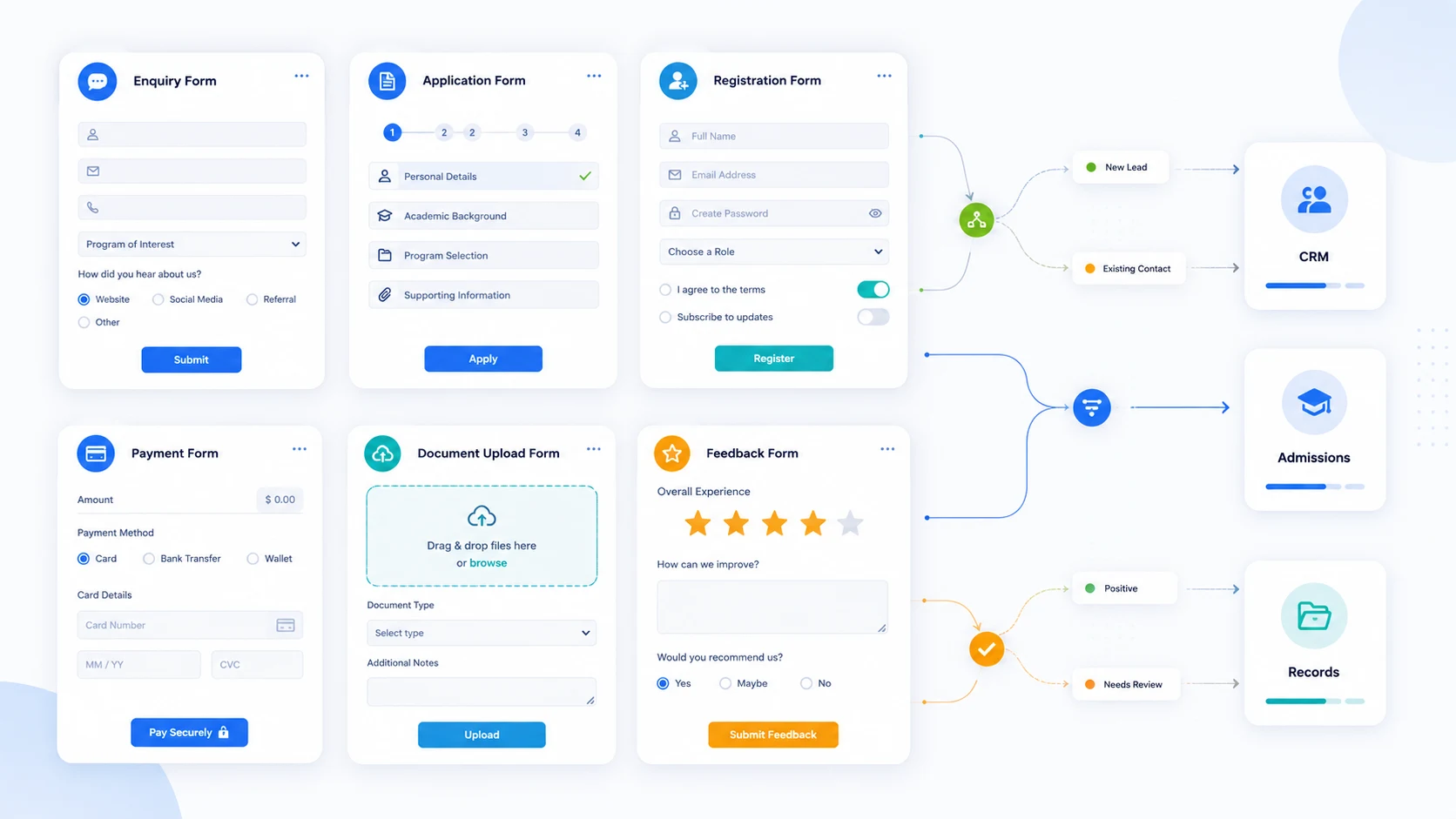
Online forms have quietly become one of the most important pieces of software a marketing, operations or admissions team runs. They are no longer just contact forms tucked into the footer of a website. They capture enquiries, qualify leads, collect applications, take payments, register attendees, gather documents, route data into CRMs and student systems, and trigger downstream workflows that involve real money and real decisions.
For higher education institutions, the stakes are higher still. A form is often the first structured interaction a prospective student has with an institution, and it tends to sit at critical points across the student journey: enquiry capture, open day sign-ups, application forms, document uploads, scholarship submissions, short course registrations, payment collection, and post-enrolment feedback. When these forms feed into admissions decisions, official student records or compliance-bound processes, the choice of form builder stops being a marketing preference and starts being an operational decision.
Generic form builders do an excellent job for many of these tasks. For others, particularly anything that touches admissions workflows, applicant records or payments tied to an enrolment, an institution will quickly outgrow them. This article compares 15 online form builders relevant in 2026, across general-purpose tools, enterprise platforms, design-led builders, CRM-connected forms and one specialist higher education option. The aim is to help you match the right tool to the right job, not to crown a single winner.
The development and maintenance of an in-house system is a complex and time-consuming task. Full Fabric lets you turn your full attention to maximizing growth and performance.

An online form builder is a tool that lets teams create digital forms without coding, collect responses, validate fields, route data, trigger notifications and integrate with other systems. The category covers everything from free survey tools to enterprise platforms with HIPAA-level security and conditional workflows.
The use cases are broader than most teams realise:
Some products do one of these things very well. Others try to cover all of them. The right tool depends on where the form sits in your operation and where the data has to go next.
Before comparing specific products, it helps to be clear about evaluation criteria. The following are the questions that matter most when teams choose form builder software in 2026.
Ease of use. Can non-technical staff build and update forms without involving IT? This is usually the first filter, but it should not be the only one.
Design flexibility. Can the form match your brand, sit cleanly inside a website, and feel native rather than embedded? For marketing and recruitment forms, this affects completion rates.
Conditional logic and multi-step forms. Real-world forms branch. An application form for an MBA looks different from one for a short executive course. Logic, page breaks and dynamic fields matter as soon as forms get serious.
Accessibility and mobile experience. WCAG conformance and responsive behaviour are non-negotiable for public-sector and education buyers. Many forms still fail basic mobile usability tests.
Data validation and file uploads. Applications and document collection often require uploads, file-type restrictions and validation on identifiers like national IDs, passport numbers or programme codes.
Payments. If forms take fees, deposits or registration payments, you need PCI-compliant payment processing, refund handling and reconciliation, not just a Stripe button.
Integrations. Where does the data go? Into a CRM, an email tool, a spreadsheet, a student information system, a finance platform? Native integrations save weeks of work and reduce error.
Workflow automation and notifications. Beyond integration, can a submission trigger an internal workflow, an assignment, a status change or a follow-up sequence?
Security and compliance. GDPR, FERPA, SOC 2, ISO 27001, data residency. For higher education and regulated industries, this section often eliminates products quickly.
Reporting and export. Built-in reporting, dashboards, scheduled exports, and the ability to query submissions without manually pulling CSVs.
Collaboration and permissions. Multiple users, roles, audit trails and approval flows.
Scalability and pricing. Pricing models vary widely, from per-form to per-submission to per-user. The cheapest option at low volume can be the most expensive at scale.
Suitability for your specific workflow. A simple enquiry form has very different requirements from a multi-stage admissions application. The same product rarely excels at both.
The 15 platforms below are not directly comparable on a single ranking. They fall into different categories, and the right choice depends on which category fits your problem:
Treat the list as a map, not a leaderboard.
| Platform | Best for | Category | Key strengths | Watch-outs |
|---|---|---|---|---|
| Typeform | Marketing forms, lead capture, surveys | Conversational, design-led | One-question-at-a-time UX, brand-friendly | Pricing scales quickly with volume |
| Jotform | All-round form building | General-purpose | Huge template library, payments, integrations | Interface can feel cluttered |
| Formstack | Regulated workflows, enterprise forms | Enterprise, workflow | Document generation, approvals, HIPAA | Steeper learning curve, higher cost |
| Google Forms | Internal forms, simple surveys | Free, lightweight | Free, instant, Google Workspace integration | Limited logic, basic design |
| Microsoft Forms | Microsoft 365 environments | Free, lightweight | Included with M365, Excel-friendly | Limited customisation and integrations |
| Full Fabric | Higher education applications and admissions | Specialist higher education platform | Forms tied to CRM, admissions, payments and student records | Not a generic form builder for surveys or internal forms |
| FormAssembly | Salesforce-connected enterprise forms | CRM-connected, enterprise | Deep Salesforce integration, compliance | Built around Salesforce; cost reflects it |
| Paperform | Branded forms, bookings, payments | Design-led, general-purpose | Document-style editor, strong commerce features | Can be overkill for simple forms |
| Cognito Forms | Logic-heavy forms with payments | General-purpose, mid-market | Generous free tier, advanced logic | Less polished design output |
| Zoho Forms | Zoho ecosystem and SMB workflows | General-purpose, CRM-connected | Tight Zoho integration, fair pricing | Best inside the Zoho stack |
| Tally | Quick, free, no-friction forms | Free, design-led | Notion-like editor, generous free plan | Fewer enterprise features |
| Fillout | Modern forms, databases, AI features | General-purpose, modern | Strong Airtable/Notion integration, clean UX | Younger product, smaller ecosystem |
| Wufoo | Simple, reliable forms | General-purpose, lightweight | Long-established, easy to use | Has not evolved as fast as newer rivals |
| Feathery | Developer-friendly complex forms | Enterprise, developer-led | Multi-step logic, financial/regulated workflows | Requires more technical setup |
| SurveyMonkey Forms | Surveys and structured data collection | Survey-led, general-purpose | Strong analytics, established survey methodology | Form-builder feature set narrower than dedicated tools |
Typeform popularised the conversational, one-question-at-a-time form, and it remains the reference point for design-led form building. The product now sits in a broader category Typeform calls "asynchronous" form experiences, with growing investment in AI-assisted form creation, video questions and qualification flows for sales teams.
Best for: Marketing forms, lead capture, customer feedback, brand-sensitive surveys.
Key strengths: Excellent user experience, strong completion rates on well-designed forms, polished templates, growing AI features for routing and follow-up.
Watch-outs: Pricing scales quickly with response volume. The conversational format does not suit every use case, particularly long structured forms like applications, where users prefer to see all sections at once.
Why it matters: Typeform is hard to beat for forms where conversion rate and brand perception are the priorities. It is less suited to high-volume operational forms or anything that needs to feed structured admissions or student records.
Jotform is one of the most established general-purpose form builders. It offers a large template library, broad integrations, built-in payments, PDF generation and a long list of niche features that cover most everyday use cases.
Best for: Teams that want a single tool to handle a wide range of forms, from contact and registration to payments and approvals.
Key strengths: Breadth of features, large integration catalogue, strong payment options, HIPAA-compliant tier available, mature mobile apps.
Watch-outs: The interface can feel busy. Heavy reliance on add-ons and a feature-by-feature pricing model can make total cost harder to predict than it first appears.
Why it matters: Jotform is a sensible default for organisations that need a versatile form builder without committing to an enterprise platform.
Formstack has moved well beyond form building into a workflow and document automation platform. It covers forms, document generation, e-signatures and approval flows, and is well-established in regulated industries including healthcare, financial services and government.
Best for: Enterprise teams that need compliant forms tied to document workflows and approvals.
Key strengths: HIPAA compliance, document generation, e-signatures, conditional routing, audit trails.
Watch-outs: More expensive and more complex than mid-market form builders. The platform rewards investment but is overkill for simple forms.
Why it matters: When forms are part of a serious workflow with compliance requirements, Formstack is one of the few platforms that can handle the whole chain.
Google Forms remains the default for quick, free, internal forms in any organisation already using Google Workspace. It is straightforward, reliable and integrates naturally with Google Sheets, which is often enough for surveys, internal requests and lightweight registrations.
Best for: Internal forms, simple surveys, quick polls, low-stakes data collection.
Key strengths: Free, instant to set up, native Sheets integration, familiar to almost everyone.
Watch-outs: Design is limited, conditional logic is basic, and there is no serious workflow, payment or CRM integration. Public-facing branded forms usually need something else.
Why it matters: For internal and casual use, Google Forms is hard to displace. For anything customer-facing or operational, it is rarely the right long-term answer.
Microsoft Forms plays a similar role inside the Microsoft 365 ecosystem. It is included with most business plans, integrates with Excel, Teams and Power Automate, and is the natural choice for organisations standardised on Microsoft.
Best for: Internal forms inside Microsoft 365 environments, quizzes, simple surveys.
Key strengths: Included in M365, Excel-friendly outputs, Power Automate hooks for workflow.
Watch-outs: Customisation is limited, design options are basic, and external-facing branded forms generally look out of place.
Why it matters: If your institution lives in Microsoft 365, Microsoft Forms is the lowest-friction way to spin up internal forms. It does not replace a dedicated form builder for marketing or admissions.
Full Fabric is not a generic form builder, and it should not be evaluated as one. It is a higher education platform that combines CRM, admissions, applications, payments, communications and student records in a unified system. Forms are one part of that platform, but they are designed to work as the front end of structured admissions and student lifecycle workflows rather than as standalone web forms.
Best for: Universities, business schools, executive education providers and lifelong learning organisations whose forms feed directly into admissions decisions, applicant records, payments and student data.
Key strengths: Enquiry, application and registration forms connect natively to the higher education CRM, admissions and enrolment software and student information and management system. Forms can trigger structured admissions stages, route applications to reviewers, collect documents, take application fees and deposits, and write back into a single applicant record. Multi-programme institutions can run different forms for executive education, postgraduate, undergraduate or short course pathways without rebuilding the underlying data model each time.
Watch-outs: Full Fabric is not a substitute for a lightweight form tool when an institution only needs a basic survey, an internal request form or a one-off feedback collection. It is designed for high-value forms that sit on the student journey, not for everyday internal admin.
Why it matters: Most higher education teams discover that the cost of using generic form builders for admissions is hidden: duplicate records, manual CSV uploads, broken handoffs between marketing and admissions, payment reconciliation in spreadsheets, and applicant data scattered across tools. Full Fabric is built for institutions that want their online application forms to be the front door to a single, connected admissions and student lifecycle system rather than a collection of disconnected submissions.
FormAssembly is built around deep integration with Salesforce and has carved out a strong position in higher education, healthcare and other regulated sectors that run on Salesforce. It supports complex data routing, prefill from Salesforce records, and compliance with HIPAA, FERPA, GDPR and PCI DSS.
Best for: Salesforce-centric organisations that need compliant forms tied directly to CRM records.
Key strengths: Native Salesforce integration, strong compliance posture, conditional logic, prefill and update workflows.
Watch-outs: The value depends on being a Salesforce shop. Cost reflects the enterprise positioning.
Why it matters: For institutions running Salesforce as their CRM, FormAssembly is one of the most credible options for connecting forms to records without custom development.
Paperform takes a document-style approach to form building, where forms can read more like landing pages with embedded fields. It has grown into a versatile tool covering forms, bookings, payments and order capture.
Best for: Branded forms, bookings, small commerce, content-rich registrations.
Key strengths: Distinctive editor, strong commerce features, calculations, conditional content, theming.
Watch-outs: Some teams find the document metaphor unfamiliar. It can be more than needed for simple forms.
Why it matters: Paperform is a strong alternative when forms need to feel like part of a webpage rather than a separate widget, particularly for marketing and small commerce use cases.
Cognito Forms is a mid-market form builder known for advanced conditional logic, calculations, payments and a notably generous free tier. It is often chosen by teams that have outgrown free tools but do not need enterprise pricing.
Best for: Logic-heavy forms with payments at mid-market price points.
Key strengths: Strong conditional logic, repeating sections, payment options including Stripe and PayPal, HIPAA-compliant tier.
Watch-outs: Design output is functional rather than design-led. Less of an ecosystem than Jotform or Formstack.
Why it matters: When a form has real logic and payment requirements but does not justify enterprise spending, Cognito Forms is a credible middle ground.
Zoho Forms is part of the broader Zoho suite. Its natural advantage is tight integration with Zoho CRM, Zoho Campaigns and the rest of the Zoho stack, making it a sensible default for organisations already standardised there.
Best for: SMBs and mid-market teams running on the Zoho ecosystem.
Key strengths: Native Zoho integration, fair pricing, solid feature set covering logic, payments and approvals.
Watch-outs: Strongest when used inside Zoho. Outside that ecosystem, other tools may fit better.
Why it matters: For Zoho customers, Zoho Forms removes a category of integration work and keeps data in one place.
Tally has built a strong following by offering a Notion-style editor, a generous free plan with unlimited forms and submissions within fair usage guidelines, and a clean modern interface. It is increasingly used by startups and small teams that want something better than Google Forms without committing to a paid plan.
Best for: Modern, free, no-friction forms.
Key strengths: Notion-like editing, very generous free tier, clean design, growing integration set.
Watch-outs: Fewer enterprise features and less depth than mature general-purpose tools.
Why it matters: Tally has changed expectations of what a free form builder can look like. For teams that previously defaulted to Google Forms, it is worth a serious look.
Fillout positions itself as a modern form builder for teams that work in databases like Airtable, Notion, Google Sheets and Salesforce. It is designed to write to and read from these systems natively, with strong support for multi-step forms, payments and AI-assisted form building.
Best for: Teams that want forms tightly connected to Airtable, Notion or similar databases.
Key strengths: Native database integrations, modern UX, payments, scheduling, AI features.
Watch-outs: Younger product with a smaller community than Jotform or Typeform.
Why it matters: For operations and product teams that have built their stack around no-code databases, Fillout removes a lot of integration friction.
Wufoo is a long-established online form builder, now part of SurveyMonkey. It is useful for simple custom forms, registrations, surveys and payment forms, and remains a familiar choice for teams that want something dependable without much setup.
Best for: Simple, reliable web forms, registrations and lightweight payment forms.
Key strengths: Ease of use, mature product, broad familiarity, payment integrations.
Watch-outs: It remains reliable, but the product feels less modern than newer form builders, and its integration set is narrower than current alternatives.
Why it matters: Wufoo continues to do a job it has done well for many years. Teams already using it rarely have a strong reason to leave, but new buyers usually evaluate it alongside more modern options.
Feathery has emerged as a developer-friendly platform for complex, multi-step forms in regulated industries, particularly financial services. It supports advanced logic, integrations, custom code and conditional flows that are difficult to build in standard form tools.
Best for: Complex multi-step forms in regulated workflows.
Key strengths: Powerful logic engine, developer extensibility, strong handling of long structured forms.
Watch-outs: Requires more technical investment than typical form builders. Less suited to non-technical teams.
Why it matters: For organisations whose forms are essentially small applications, with branching logic, document handling and integrations, Feathery offers more depth than mainstream tools.
SurveyMonkey Forms extends SurveyMonkey's long-standing survey expertise into a broader online form builder. SurveyMonkey is best known for surveys, but the forms product now covers use cases such as event registrations, applications, internal requests, payments and structured data collection.
Best for: Organisations already using SurveyMonkey that want to consolidate forms and surveys in one place, particularly for feedback-led data collection.
Key strengths: Strong analytics, established survey methodology, registration and payment-capable forms, audience and reporting tools inherited from the survey product.
Watch-outs: As a pure form builder, its feature set may be narrower than dedicated form builders like Jotform, Formstack or Typeform.
Why it matters: SurveyMonkey Forms is rarely the only form tool an organisation uses, but it is a sensible choice when feedback, surveys and structured data collection dominate the use case mix.
A useful way to narrow the field is to start from the use case, not the product.
If you need simple free forms. Google Forms, Microsoft Forms or Tally will handle most internal requests, basic surveys and quick polls without cost or complexity.
If design and completion rate matter most. Typeform, Paperform and Tally tend to win on user experience and brand. For marketing forms and lead capture, this often translates directly into completion rate.
If you need advanced logic and workflows. Cognito Forms, Jotform, Formstack and Feathery handle complex branching, calculations and conditional flows.
If forms need to connect to a CRM. FormAssembly is the strongest choice for Salesforce shops. Zoho Forms is the natural fit inside Zoho. HubSpot users typically use HubSpot's own forms. For higher education institutions, CRM-connected forms inside a unified student platform avoid the integration overhead entirely.
If forms collect payments. Jotform, Cognito Forms, Paperform and Fillout all handle payments well. Once payments are tied to enrolments, deposits or programme fees, a dedicated admissions platform usually makes more sense.
If forms are part of admissions or student applications. This is where general-purpose form builders typically run out of road. Multi-stage applications, document collection, reviewer routing, deposit handling and integration with student records usually require a specialist platform rather than a generic form tool.
If security and compliance are critical. Formstack, FormAssembly, Feathery and Jotform's HIPAA tier are the credible options. Buyers should look at SOC 2, GDPR, data residency and sector-specific certifications.
If you need forms for higher education. Lightweight forms can sit on Tally, Google Forms or Typeform. Anything tied to admissions, applications, payments or student records belongs in a platform purpose-built for the student lifecycle.
If implementation speed matters. Tally, Google Forms, Microsoft Forms and Typeform can be live in an afternoon. Enterprise platforms take longer but pay back in workflow.
A few patterns come up repeatedly when teams regret their choice.
Choosing on design alone. A beautiful form that does not write cleanly into your CRM or student system becomes a maintenance problem within months.
Underestimating where form data needs to go. Form selection is really data routing selection. If the data has to end up in a CRM, an SIS, a finance system and an inbox, the form is the smallest part of the problem.
Using generic forms for complex admissions workflows. Application forms are not contact forms. They have stages, reviewers, documents, deadlines, fees and decisions attached. Treating them like simple web forms leads to spreadsheets, duplicate records and broken handoffs.
Ignoring GDPR and consent management. Consent has to be granular, auditable and respected downstream. A form that captures consent but does not pass it cleanly into the systems acting on the data creates real risk.
Forgetting accessibility and mobile usability. A significant share of form traffic is mobile. Forms that pass desktop QA but fail on phones quietly lose conversions and exclude users who depend on assistive technology.
Relying on manual CSV exports. If your operational process depends on a weekly export and a VLOOKUP, the form builder has effectively become a bottleneck.
Not planning integrations early. Integration is often treated as a phase-two concern. By phase two, the form is already collecting data, and retrofitting integration is more expensive than building it in.
Ignoring duplicate records and data quality. Multiple forms feeding the same CRM without deduplication create the slow, structural mess that takes years to clean up.
Treating application forms like simple contact forms. Admissions teams need stages, statuses, documents, communications and decisions on top of the form. A form that ends at "submitted" only solves the first 10 per cent of the problem.
Not involving IT or admissions operations when forms feed official systems. Forms that connect to official student records need to be designed with the people who own those systems, not in isolation by a single team.
There is no single best online form builder for 2026. There is a best fit for each use case.
For simple internal forms and quick surveys, Google Forms, Microsoft Forms and Tally are hard to beat on cost and speed. For polished marketing forms and lead capture, Typeform, Jotform, Paperform and Fillout offer the best combination of design and conversion. For enterprise workflows, regulated industries and document-heavy processes, Formstack and FormAssembly are the established choices. For complex, branching, application-style forms, Feathery and Cognito Forms have real depth.
For higher education institutions, the calculus is different. Forms that capture enquiries, register applicants, collect documents, take application fees and feed admissions decisions are not really forms. They are the front end of an admissions and student lifecycle process. When those forms sit inside a unified platform that already handles CRM, connected admissions workflows, payments, communications and student records, the operational picture is fundamentally different from running half a dozen disconnected form tools.
If you are evaluating tools for marketing forms or internal surveys, the list above will serve you well. If you are evaluating tools for application management, admissions or student data capture, it is worth looking at a student application management system built for the job, rather than retrofitting a generic form builder to do work it was never designed for.
An online form builder is a tool that lets teams create digital forms without coding, collect responses, validate fields, route data to other systems and trigger notifications or workflows when a form is submitted. Common uses include enquiry forms, applications, surveys, registrations, payment forms and document collection.
There is no single best option. Typeform and Paperform are strong for design-led marketing forms; Jotform and Cognito Forms are strong all-rounders; Formstack and FormAssembly suit enterprise and CRM-connected workflows; Tally, Google Forms and Microsoft Forms are well-suited to simple or internal forms; and Full Fabric is the specialist choice for higher education application and admissions workflows.
Google Forms, Microsoft Forms and Tally offer the strongest free experiences. Tally is notable for offering unlimited forms and submissions on its free tier within fair usage guidelines, while Google Forms and Microsoft Forms are the natural choices inside Google Workspace and Microsoft 365.
Beyond the standard criteria, higher education buyers should look at how forms connect to the CRM and student information system, how applications and documents are handled across multiple stages, how payments and deposits are reconciled, how GDPR and consent are managed, and whether the platform supports the diversity of programmes an institution runs, from undergraduate to executive education and short courses.
Yes. Jotform, Cognito Forms, Paperform, Fillout, Formstack and several others support payments through Stripe, PayPal and similar providers. For payments tied to enrolments, deposits or programme fees, institutions usually need payment handling that integrates with their admissions and student records, not just a payment gateway sitting behind a form.
When forms become part of an admissions decision, feed an official applicant or student record, handle programme fees or deposits, involve document collection and reviewer workflows, or run across multiple programmes and intakes. At that point, generic form builders create integration debt that a purpose-built admissions and student lifecycle platform is designed to avoid.